Showing posts with label Multimedia Experience. Show all posts

Tuesday, November 30, 2010

Portfolio Site: 3 Stages of Interaction

I am proposing to use Squarespace for my online portfolio space, because it lends to flexibility. I am not confident in code, but I can do it, it just takes time. I have looked into a couple of tutorials on the Squarespace site, and it seems very easy to update. My biggest fear is not being able to update in a years time. I want something that I can rely on, and I am willing to pay the monthly fee to have a stable website. My blog can also directly embed into Squarespace with the click of a button, which is great. I think that being able to able to see someones process is extremely important. I know that it is possible to build the look & feel of my designed site in Squarespace, because of the examples that I have seen. The potential is there. I have the ability to add pages, and to add my own chunk of code. If I can't figure out how to get something to work within a template, I am able to ask or google how to make it work. I have a feeling that I won't have to go to my own code too often If the templates are flexible enough. I want my portfolio site to be welcoming, and I want to put a small illustrative detail on each screen. I want the work to be framed by my design, not competing with it.


My portfolio Site Map

Sunday, November 28, 2010

Portfolio Site: The Beginnings

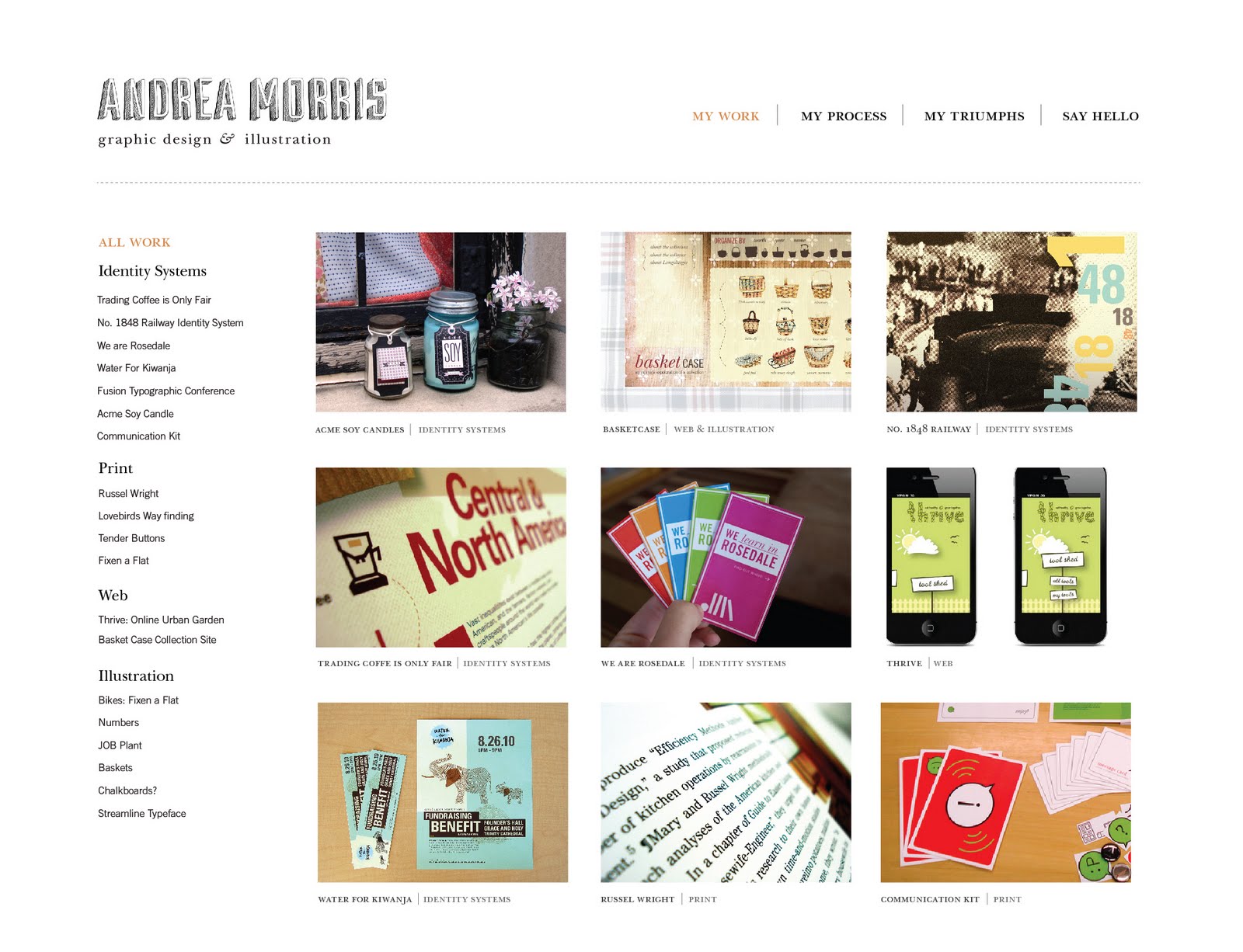
These are a few options for the look and feel of my personal portfolio site. I want to let the veiwer see my work on the initial screen, and I also want to speak to them. This is why I have incorporated a welcome message along with some featured work. The top option is my favorite, and I have more background texture options. The background texture is my moleskine, which only makes sense. I sketch in that thing all of the time.


These were my sketches that lead to the digital sketches above. I blended the first option and the second option. We thought that the third option was to confined and that it was lacking practicality.


This is the start of my site map. It is really difficult pulling all of your work up and organizing it! I decided to go with these categories, Identity Systems, Print, Web, and Illustration.

Wednesday, November 17, 2010

Inspiring Websites

Monina's Site

Jessica Hische's Site
Ydabaz Portfolio Site
These are some site names that are available for me,
andreamorris.net
andreamorris-design.com
mo-designonline.com
mo-designsite.com
gimme-some-mo.com or gimmesomemo.com
mo-design-mo-problems.com or modesignmoproblems.com
design-by-mo.com
amorris-design.com
mymo-design.com
modesignthink.com
mobettadesign.com
modiggity.com

Monday, November 1, 2010

Thrive Final Screens and Script

Scenario: The garden
Mobile Device: ipad


Scenario: Tool Shed
Mobile Device: Iphone


What is the Community?

Welcome to Thrive, an online urban garden facilitating cooperative gardening projects on a single 2 acre plot for some 40 members. The individuals live in close proximity to the garden but have developed this online solution to prvide support in its many physical endeavors and a place to share knowledge and expertise, information that is freely available to all its members. Within Thrive there are many different points of entry and levels of participation. All can learn to grow in Thrive no matter age, experience or knowledge.

Who are the individuals?

There are professionals, novices, single gardeners, groups and families. The online community facilitates group interaction, physical help, education and shared knowledge on mobile devices, like the iphone and ipad. These digital solutions serve individual needs helping to build a greater sense of community.

Lauren

Lauren is married with tw children. She has gardened for 12 years in her own back yard and now is a part of the Thrive community. Lauren prefers to garden a small plot within the larger Thrive garden by herself but enjoys being part f a larger community of people who care for the earth. She keeps all her tools in the community shed where people can borrow them by logging in to the hub or by communicating via a mobile device.

When Lauren is out in the garden she is able to see all her tools in the community tool shed at a glance by using her phone. If she takes something new to the garden she can also photograph it and upload it before placing it in the community tools shed. If she needs an item she doesn't have while out in the garden, like gloves for her kids, she can do a search and find exactly what she needs without walking to the shed which happens to be the other side of the garden. If she finds what she's looking for she can save time by directly borrowing the tool without even scheduling time to meet the owner. This community tools shed not only saves gardeners time it makes tool sharing really easy and efficient.

Now lets say Lauren is at home and shes planning to go to the garden the next day. Maybe he wants to boorrow a spade. She can use the website to search, find the tool she likes by reading user comments and borrow, this time from Mike. If she needs other tools she doesn't have she can ee who owns what and search for something else, like a watering can. The website will even tell her specifications of each tool before she borrows it.

Dave

Meanwhile, in another part of the city, Dave and his friends are wanting to start a garden plot. They are fed up with eating fast food and want to share a garden space to grow their own food. Using the hub they can find out who gardens where according to knowledge level. Being a novice Dave would like t set up near some pros. He can claim a plot by naming one right from his own living room.

Dave and his group can even log in to their plot when they're out and about using an iPad. They can claim other plots if they need them plus, they can put vegetables in place where they planted by dragging and dropping them. By doing this Dave's new garden will correlate with other scenarios in the thrive system. For example the system will then be able to give Dave alerts such as; when he should water his tomato plant or what bugs might be eating your bell pepper. Whether they're at home or mobile, the hub and the iPad offer Dave and his team a great resource to see what's happening with their new garden. This will allow Dave to grow and learn more about his plot.

Conclusion

The Thrive community benefits all of its members in many different ways; the hub allows users the luxury to see what's going on in the garden when the weather is bad; yu are able to share tools with a knowledgeable community, ,and even if your expertise is low, you can grow your garden near someone who knows how. The online solutions facilitate a greater sense of togetherness in the gardening world.

By joining thrive you will not only be exposed to a new world of eating healthy food, because you're growing it, you will meet other like-minded people who enjoy gardening just as much as you do.

Monday, October 11, 2010

Urban Farming: Second Round Iphone & Ipad

This is a new attempt at a more fun and "thriving" urban farming community. I tried to blend illustration with digital iconography. I seemed to really enjoy the idea of abstraction, but still used simple shapes like signs and arrows. I'll start with the ipad.


This is the same visual direction for the iphone.


Sunday, October 10, 2010

Urban Farming: 3D Web Model

In my web model I thought of the base as the hub that holds all of the information. Through the bases shoots up all of the other information. Each clay block on the wood stick are thought of as smaller bases that hold information. Inside each one of these is more information that explodes outward. The wires that surround the model are representing content that is linked to a different clay block. I was looking at how information can be inter-related, and how it can travel across different "bases" of held information.
Each of the colored pieces of paper represent small bits of content. The colors are all different to represent different content. Only when the paper is connected to the same clay base are they the same color. They are directly related information, for example, the tool shed contains "My tools". Whithin "My tools" are all of your tools, but your tools does not exist under "who's in the garden."

Friday, October 1, 2010

Urban Farming: Site Map

This is our site map so far. Tom made it look nice and pretty. We still have to flush out the other links more in detail, like we did with the "My Area" link.

Tuesday, September 28, 2010

Urban Farming: Branding

So Tom and I have decided on a few names for our Urban Farm Community. And they are...

Thrive
Grow
Rooted

Here are a few visual explorations so far...


Sunday, September 26, 2010

Windows and Mirrors: Introduction

The introduction to this reading brings up a really interesting point. The author mentions Donald Norman who quotes "...computers as we know them are going to disappear". He was basically saying that computers will be absorbed by "information appliances". These appliances will not be thought of as computers, but as electronics that perform tasks for us. It is sort of a scary thought. I automatically think of robots, that will then turn on us and take over the world or something. weird. He doesn't go that far, but he gives us an example of his thoughts through a vacuum cleaner.
The author says that in fact computers are not going to disappear due to digital art. He believes that computers will always fascinate us and will not entirely get absorbed into information appliances. Some will, with electric motors, but most will likely stick around. It was a nice and juicy intro to the reading.

Urban Farming: Final Presentation

Urbanfarm Pres

We decided to combine a couple of wire-frames, and to get rid of one. We got rid of the calender, because it was uninteresting. We combined the Weight/Ripeness and Disease plant wire-frames into one. We have decided that the ones who will give feedback are the pros that are members of the sight. We also decided that the fantasy garden wire-frame is for people who don't have access to the urban garden, or the time, but are interested in learning. We also went more in depth on what really encompasses the individual and the community.

Tuesday, September 21, 2010

The Web is Dead: A Response

Will the Web disappear in favor of mobile only interaction?

It is tough to say or to predict if the web will in fact disappear. Maybe its better to say that the web is only going to be innovated by its users. We are the ones who control the web and its devices, through tags and other sources. The reading quotes "...less about the searching and more about the getting". We see the relationship to the browser as old, but the idea of mobility is new. We are attracted to it. I wouldn't say that the web will disappear, but that the web will only innovate itself through all of its users, but mobility will always have a relationship to the web.

What are some of the differences you see as a designer in designing for mobile smartphones, mobile tablets, and browser based interactive?

The biggest difference that I see is that it isn't 2dimensional. Once you move into designing an application for human touch, it starts to touch more on the ideas and philosophies of anthropology. We are getting bringing technologies closer to us, and we are relating more to them. Soon enough we will be controlled by the machine. Google instant sort of does this in the fact that it gets to know us. It starts to pick up on key words and will finish a sentence before we stop typing. Amazon will also start to pick out books for us based on our purchases that have already been made.
As a designer we shouldn't only think about what happens on screen, but what happens off screen. We only assume that the interaction will be through a keyboard and a mouse. In terms of mobile tablets, smartphones, and browser based interactive; we have many different things to consider. We have to come up with solutions that are mobile in an of themselves. They have to be flexible, and should be able to transition from the screen to the environment fluidly.

What are their differences in standpoint, simply stated? Are you for the democratic, user-delivered-content web or the closed expert delivered content of the app world?

I personally am for the democratic, user-delivered-content web over the closed expert delivered content. I am a huge fan of the idea of collaboration, and the idea that human beings can combine together to create. It is less competitive, and more collaborative. As a collective we should be able to come up with the most concise answers compared to one individual, who is biased and inexperienced. When you combine all experiences into one solution or answer you start to see it from all sides. I am mostly referring to Wikipedia when I am talking about this, because it lets anybody edit it. I think that it is only credible when their are sources however. My thoughts are that one day, everyone collectively, will be creating apps.

Is Steve Jobs monomaniacal or a saint?

Steve Jobs seems to be a very lucky individual. I wouldn't say that he is a saint or that he is monomaniacal. He just happened to make the right decision at the right time, and he may or may not have known that society was ready for apps. He could have made an investment elsewhere, and not have been as successful. The history of the internet proves that you cannot predict what will happen in the future. You may come close, but their is no possible way to do it. It has shown in the past that it is ruthless and brutal to companies. They compared it to capitalism saying "...natural path of industrialization: invention, propagation, adoption,control." I personally don't think that Jobs was looking to start a monopoly or to gain power. He just so happened to make the right decision, and literally fell into success. Or I guess I should say that he was embraced by us. He was an expert in the app world who seemed to gain favor by the users.

Sunday, September 12, 2010

Urban Farming: On-line Solutions

1. Tetris Garden
NEED: A novice needs to know how to plant certain plants, and where to plant certain plants in relationship to others.
This feature will take in what the user is planting, and the size/proportion of their plot. It will be able to show the user where to plant the tomato plant in relationship to the ocra plant and so on. It will more specifically show the user the best way to plant the garden geographically. They will be able to see this garden unfold on their ipad, and they will be able to drag icons of plants too see if they can't figure it out first. The system will be able to tell them why a plant can't be planted next to another, and will automatically fix it for them.

2. Ripeness Meter
NEED: Our users need to know whether or not the produce they good is ripe enough to eat.
The user will be able to take a photo with their iphone, or upload an image on-line. They will be able to automatically see info overlaid on the image, that will reveal how ripe the produce is. It will also be able to tell them if it is good to eat. They will be able to take take a picture with their iphone, and the information will overlay on top of the image. They will also be able to weigh their produce with this feature, by laying a tomato on the iphone it will take in ounces.

3. Caring Schedule
NEED: The user needs to know when to water the plant, and when to feed it to keep it healthy/alive.
This will be an on-line schedule that will remind the user daily of when to water their plant, feed their plant, etc. It will provide the user with knowledge on how to successfully grow the plant day by day. The iphone will give them daily updates, and alarms that might say "water the tomato plant once in the morning and afternoon. Be sure to sure to use at least 2 cups of water each time."

4. Volunteer Schedule
NEED: Our users need one master schedule in order to communicate in terms of who will work when, and who can work.
A large on-line database will keep track of volunteers schedules. They will all theoretically have bios, and they will be able to see which farms are needed help on specific days. This way they can volunteer wherever, whenever. This feature will be on the iphone, and on-line. The volunteers can check in on their iphone, and it will automatically tell the online hub that they showed up.

5. Rewards
NEEDS: The proud urban farmer needs some feedback and reckognition on how great they are.
By uploading photographs, via iphone or camera, the members of the site will receive recognition for their gardening strengths. Rewards will probably consist of being on the initial page of the site for a month. It could be for best looking tomato, or largest eggplant, etc...

6. Location Finder of plot
NEED: A user that is new to the area might need to find a spot within the large urban farm to plant their tomatoes.
Our users will be able to locate new and old plots for their produce. They can find plots that are near or far, and plots that specialize in certain produces. This will benefit those that are new to the city, but haven't been able to plant their own produce yet. For example...Hey! we're looking for a new volunteer who would like to plant some cabbage on the east side of the north land plot. They can use this feature online, so they can utilize some large mapping features.

7. Land meter
NEED: The user is planting an eggplant and needs to know whether or not the soil in a specific plot has successfully grown eggplant in the past.
Each plot, registered on the site, will be rated by our users. They will be able to tell you that the plot is really good tomato's, but they may not have had much luck growing eggplant. The iphone will be primarily used in this since it is a good "on the go" device.

8. Equipment Rental

NEED: they need to borrow a shovel to plant some radishes.
For Budget purposes we will have an equipment rental feature. Instead of buying a new rake, our user will be able to rent, or even borrow, a rake for a week for another volunteer. This will also help them to socialize with other urban farmers within the area. Online, they will be able to see what is available.

9. Live Feed
NEED: Our users need visual evidence that the garden exists, and they trust that seeing the real thing.
We will also do live footage of a different urban farm each week. Our users can watch other farms from the comfort of their own home. Or, they can go to that garden when they see others planting/needing help. They can watch on any platform, iphone, ipad, or online.

10. Design a Garden
NEED: Our users need social connections, and shared knowledge between gardeners.
Our users will be able to plot their own dream garden. Others can help out, so it would be a cooperative brainstorm online. The community could type in what all they would like to plant in a certain area one day in the future. It will help them plan out new urban farms.

11. What's growing in the garden?
Each plant gets logged in the digital garden. Everyone knows what's growing so people don't plant multiples of things. Confusion is avoided with this handy dandy check list.

12. Seed Bank
The online database for the phone and the website is your one stop shop for all your seeds, including heirloom. See who's offering what, where and how much. Database includes everything in North America and Canada.

13. Seasonal Recipes
If you're growing, you're sure to be cooking. This database of nifty recipes is even tied to the What's Growing in the Garden list so it'll notify you when you should be cooking squash soup or pea fritters!

14. Sign up Schedule
As a user, you'll be able to put in your availability and the database will store the information and let you know when you're needed.

15. Disease Meter
Don't know what's gotten to your plant? Take a photo of what's happening and get instant feedback from your gardening buddies.

16. Gardener Profiles
Looking for a team member with some specific abilities? Profiles on the site will be stored in a keyword database making searching for someone much much easier.

17. Plant profiles database
This will be also available on the iPhone app. Your guide to what's what in the world of gardening will help you understand what plants when, how long you've got to go until you can pick and when and how much you should be watering.

18. Plot meter
With your iPhone you can measure the length of the garden width ways and length ways and plan your rows accordingly.

19. Activity Calendar
Of course with every garden there has to be community meals, community work days and days when you have a special teacher in town teaching on up to the minute gardening methods. Check this schedule weekly, daily or get push notifications.

20. Who's at the garden
When you're there you can check one box and it'll notify your community. A great idea for security purposes and to let your friends know you might like some company!

Thursday, September 9, 2010

Urban Farming: Initial Poster Attempts

Our Posters got some awesome feedback in the critique. The group decided that our colors were really nice, and working well. However, everything seems to be a little too nice for the "dirtyness" of urban farming. So...we are going to dirty it up a bit. We are going to look at adding some soil, changing from iceberg to romaine lettuce, and getting our images at the bottom more integrated towards the top.

In terms of typography we are going to focus on more scale change for heirarchy needs as well as legibility concerns.

Sunday, September 5, 2010

Urban Farming: The Individual

Meet Melody Souder.

Melody is a thirty year old stay-at-home mother of two children. She has a college degree in marketing and her occupation as a high-quality make-up consultant gives her the freedom to do what she really loves, gardening. She loves her job though, because she can be involved with her community socially. Her husband is a head chef at one of the local restaurants, and is gone for long hours at a time. He is a huge supporter of the urban farm that Melody volunteers at, and their restaurant uses the local produce on a daily basis. They occupy a two story home located about 3 miles away from the heart of the city, and about two blocks away from the urban farm.

Some of Melody's motivations for urban farming are;

Health -
Melody's children are getting to eat organic, unprocessed produce. This produce is much better for them than chemically treated produce from the grocery store. She also has better health from walking to the farm, and keeping active.

Empowerment -
She feels the need to be educated, and to have something to call her own. Since the community is on-line as well it gets her knowledge of new media.

Budget -
While Melody and her husband live comfortably, they are always budgeting there expenses. Growing produce is a wonderful solution to the ever increasing cost of food.

Level of Belonging -
Melody is extremely social and wants to be highly involved in her community. The social interactions not only keep her mentally healthy, but they help with her personal career as well.

Needs for community interaction

Melody values her family, and they always come first. Her children are always involved in community activities to help them develop socially and physically. Melody also values her customers, and she is able to be involved with them through community activities. She also thinks of the urban farm as a direct way to provide for her community, which she loves.

Needs for successful activity involvement.

Melody needs to be educated and knowledgeable in the art of farming produce. She also needs to have a good attitude and enough support & help (family & friends) around her in order for the activity of urban farming to be a success.

Thursday, September 2, 2010

Urban Farming Poster Sketches

I was thinking more visually when I started to sketch out our posters. I also started to sketch both for the community and the individual, since the posters are meant to work together. Most of the sketches are metaphors for instance, one plant is the individual & many plants represent community. Some of our biggest successes from these were the idea of symbols. For example, gloves are a good indicator of an individual, and a farmers market is a good indication of community.

Sunday, August 29, 2010

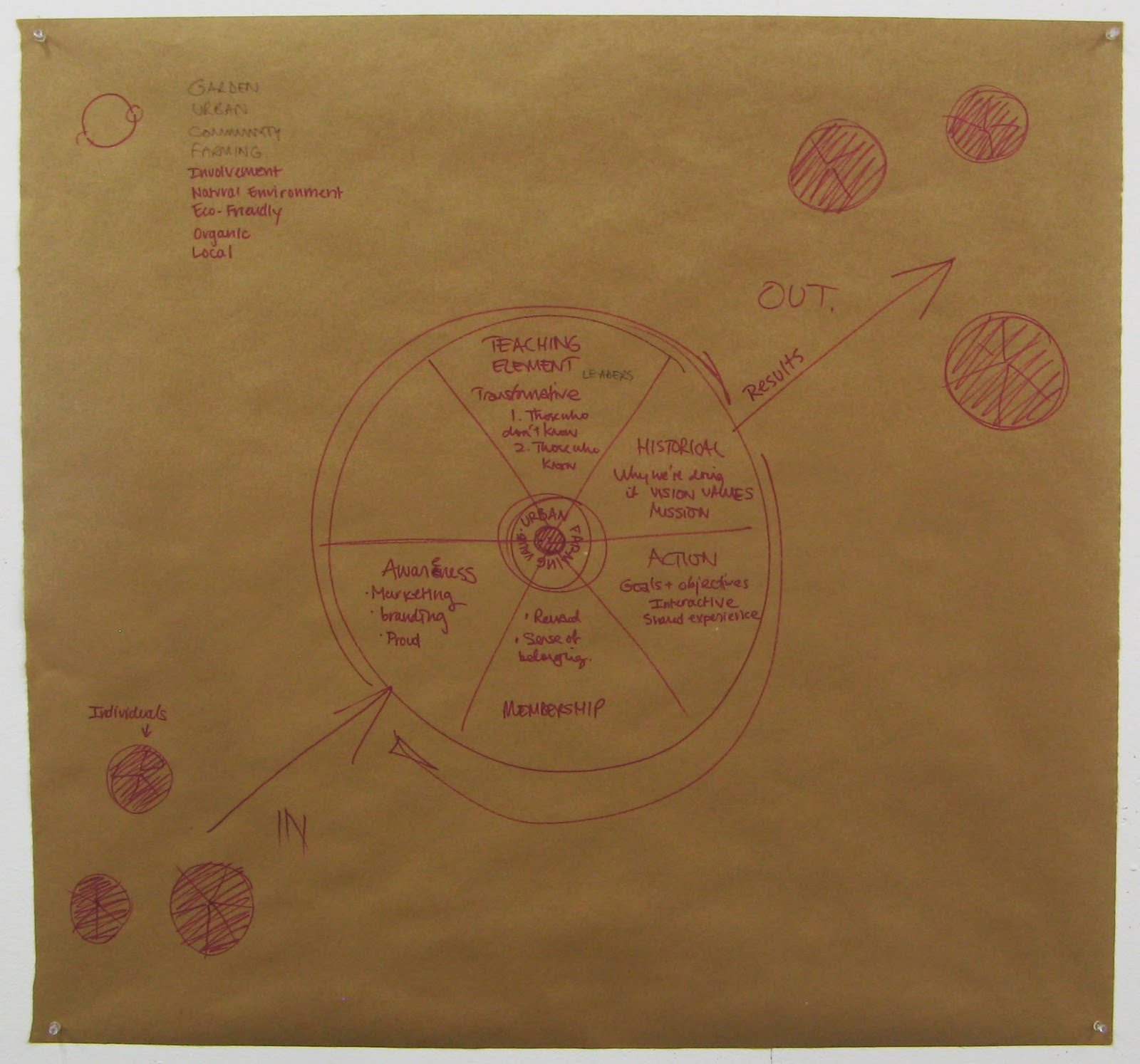
Urban Farming Brainstorm and Diagram

Our Community Diagram Draft I feel represents a community well. I always thought of a community focusing around a certain rule set (values, mission, vision). I automatically thought of the bible ( the bible is the core that brings the community together, and everyone always refers back to the text). I feel I am thinking a little marxist, but it does make sense.


The Final Digital Translation of the Community Diagram


I felt that Tom and I's brainstorming session went really well. Its interesting since we used a specific color for our individual contributions, and it really shows the collaboration. We decided to be very specific to urban farming and that helped tremendously. We weren't thinking generally, but specifically. For example we were able to think of specific tools like rakes, shovels, and gloves.